103日目:ダッシュボードに経験(experiences)と学歴・教育(school, degree etc.)を追加・編集できるようにする:Add Education & Experiences

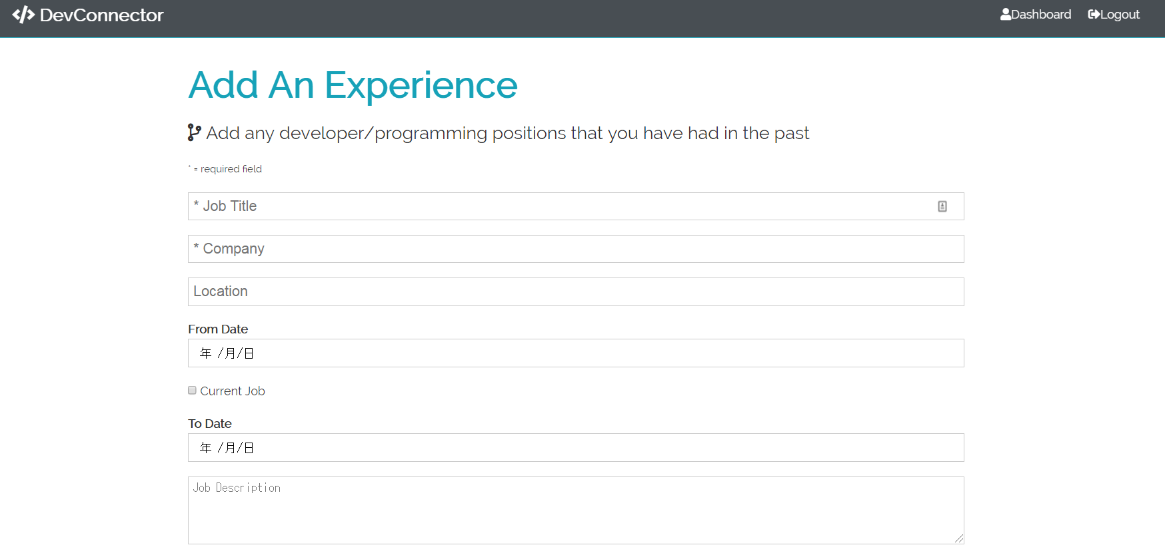
引き続きダッシュボードへ情報の追加・編集ができるようコーディングしました。今回は経験(experiences)と学歴・教育(school, degree etc.)です。(このWebアプリケーションは開発者用ですので、教育欄にはプログラミングのbootcampsも含みます。)
①client/src/actions/types.js にUPDATE_PROFILEを追加
パターン化して覚えてきました。まずは、types.jsにUPDATE_PROFILEを追加します。
export const UPDATE_PROFILE = "UPDATE_PROFILE";
②client/src/actions/profile.jsにもUPDATE_PROFILEを追加する
先程のtype.jsからUPDATE_PROFILEをインポートします。
import { GET_PROFILE, PROFILE_ERROR, UPDATE_PROFILE } from "./types";
前回と同じパターンでExperiencesとEducationが追加できるようコードを書いていきます。両方共ほぼ同じコードです。
// ADD Experience
export const addExperience = (formData, history) => async dispatch => {
  try {
    const config = {
      headers: {
        "Content-Type": "application/json"
      }
    };

    const res = await axios.put("/api/profile/experience", formData, config);

    dispatch({
      type: UPDATE_PROFILE,
      payload: res.data
    });

    dispatch(setAlert("Experience Added", "success"));

    history.push("/dashboard");
  } catch (err) {
    const errors = err.response.data.errors;

    if (errors) {
      errors.forEach(error => dispatch(setAlert(error.msg, "danger")));
    }

    dispatch({
      type: PROFILE_ERROR,
      payload: { msg: err.response.statusText, status: err.response.status }
    });
  }
};

// ADD Education
export const addEducation = (formData, history) => async dispatch => {
  try {
    const config = {
      headers: {
        "Content-Type": "application/json"
      }
    };

    const res = await axios.put("/api/profile/education", formData, config);

    dispatch({
      type: UPDATE_PROFILE,
      payload: res.data
    });

    dispatch(setAlert("Education Added", "success"));

    history.push("/dashboard");
  } catch (err) {
    const errors = err.response.data.errors;

    if (errors) {
      errors.forEach(error => dispatch(setAlert(error.msg, "danger")));
    }

    dispatch({
      type: PROFILE_ERROR,
      payload: { msg: err.response.statusText, status: err.response.status }
    });
  }
};
③client/src/reducers/profile.js レデューサーにもUPDATE_PROFILEの情報を書き足す
まずは、import部分です。
import {
  GET_PROFILE,
  PROFILE_ERROR,
  CLEAR_PROFILE,
  UPDATE_PROFILE
} from "../actions/types";
次に、function のswitch内の caseにも同じように、UPDATE_PROFILE情報を書いていきます。今回ここに書いたのは、case UPDATE_PROFILE: 一行のみです。
export default function(state = initialState, action) {
  const { type, payload } = action;

  switch (type) {
    case GET_PROFILE:
    case UPDATE_PROFILE:
      return {
        ...state,
        profile: payload,
        loading: false
      };
    case PROFILE_ERROR:
      return {
        ...state,
        error: payload,
        loading: false
      };
    case CLEAR_PROFILE:
      return {
        ...state,
        profile: null,
        repos: [],
        loading: false
      };
    default:
      return state;
  }
}
④新しいファイルを2つ作成 client/src/components/profile-form/AddExperience.jsそしてAddEducation.jsを新規作成して、記入部分を作る
AddExperience.jsに関しては、現在も今の会社に努めている場合、to(何年何月まで在籍)の部分を使わなくて良いように設定しました。
const [toDateDisabled, toggleDisabled] = useState(false);や、input name='current'のあたりのコードです。
import React, { Fragment, useState } from "react";
import { Link, withRouter } from "react-router-dom";
import PropTypes from "prop-types";
import { connect } from "react-redux";
import { addExperience } from "../../actions/profile";

const AddExperience = ({ addExperience, history }) => {
  const [formData, setFormData] = useState({
    company: "",
    title: "",
    location: "",
    from: "",
    to: "",
    current: false,
    description: ""
  });

  const [toDateDisabled, toggleDisabled] = useState(false);

  const { company, title, location, from, to, current, description } = formData;

  const onChange = e =>
    setFormData({ ...formData, [e.target.name]: e.target.value });

  return (
    <Fragment>
      <h1 className='large text-primary'>Add An Experience</h1>
      <p className='lead'>
        <i className='fas fa-code-branch' /> Add any developer/programming
        positions that you have had in the past
      </p>
      <small>* = required field</small>
      <form
        className='form'
        onSubmit={e => {
          e.preventDefault();
          addExperience(formData, history);
        }}
      >
        <div className='form-group'>
          <input
            type='text'
            placeholder='* Job Title'
            name='title'
            value={title}
            onChange={e => onChange(e)}
            required
          />
        </div>
        <div className='form-group'>
          <input
            type='text'
            placeholder='* Company'
            name='company'
            value={company}
            onChange={e => onChange(e)}
            required
          />
        </div>
        <div className='form-group'>
          <input
            type='text'
            placeholder='Location'
            name='location'
            value={location}
            onChange={e => onChange(e)}
          />
        </div>
        <div className='form-group'>
          <h4>From Date</h4>
          <input
            type='date'
            name='from'
            checked={current}
            value={from}
            onChange={e => onChange(e)}
          />
        </div>
        <div className='form-group'>
          <p>
            <input
              type='checkbox'
              name='current'
              value={current}
              onChange={e => {
                setFormData({ ...formData, current: !current });
                toggleDisabled(!toDateDisabled);
              }}
            />{" "}
            Current Job
          </p>
        </div>
        <div className='form-group'>
          <h4>To Date</h4>
          <input
            type='date'
            name='to'
            value={to}
            onChange={e => onChange(e)}
            disabled={toDateDisabled ? "disabeld" : ""}
          />
        </div>
        <div className='form-group'>
          <textarea
            name='description'
            cols='30'
            rows='5'
            placeholder='Job Description'
            value={description}
            onChange={e => onChange(e)}
          />
        </div>
        <input type='submit' className='btn btn-primary my-1' />
        <Link className='btn btn-light my-1' to='dashboard.html'>
          Go Back
        </Link>
      </form>
    </Fragment>
  );
};

AddExperience.propTypes = {
  addExperience: PropTypes.func.isRequired
};

export default connect(
  null,
  { addExperience }
)(withRouter(AddExperience));
AddEducation.jsは、上記のコードを全てコピペした上で、ExperienceをEducationに変更、companyなどの部分をschool, degree, fieldofstudyに書き換えるなどのマイナーチェンジを行いました。
⑤最後はApp.jsに今日のコーディングの情報を書き加えて、MongoDB Atlasでデータの追加・編集ができることを確認して本日の学習終了
importの部分に今日作成したAddExperienceやAddEducationの情報、そしてexperienceとeducationのPrivate Routeを書き加えました。最後に実際にlocalhostのダッシュボード画面で、ユーザーのexperiencesとeducationの情報を入力して、データがMongo DB Atlasで反映されていることを確認して本日の学習は完了となりました。
import React, { Fragment, useEffect } from "react";
import { BrowserRouter as Router, Route, Switch } from "react-router-dom";
import Navbar from "./components/layout/Navbar";
import Landing from "./components/layout/Landing";
import Register from "./components/auth/Register";
import Login from "./components/auth/Login";
import Alert from "./components/layout/Alert";
import Dashboard from "./components/dashboard/Dashboard";
import CreateProfile from "./components/profile-form/CreateProfile";
import EditProfile from "./components/profile-form/EditProfile";
import AddExperience from "./components/profile-form/AddExperience";
import AddEducation from "./components/profile-form/AddEducation";
import PrivateRoute from "./components/routing/PrivateRoute";

//Redux

import { Provider } from "react-redux";
import store from "./store";
import { loadUser } from "./actions/auth";
import setAuthToken from "./utils/setAuthToken";

import "./App.css";

if (localStorage.token) {
  setAuthToken(localStorage.token);
}

const App = () => {
  useEffect(() => {
    store.dispatch(loadUser());
  }, []);

  return (
    <Provider store={store}>
      <Router>
        <Fragment>
          <Navbar />
          <Route exact path='/' component={Landing} />
          <section className='container'>
            <Alert />
            <Switch>
              <Route exact path='/register' component={Register} />
              <Route exact path='/login' component={Login} />
              <PrivateRoute exact path='/dashboard' component={Dashboard} />
              <PrivateRoute
                exact
                path='/create-profile'
                component={CreateProfile}
              />
              <PrivateRoute
                exact
                path='/edit-profile'
                component={EditProfile}
              />
              <PrivateRoute
                exact
                path='/add-experience'
                component={AddExperience}
              />
              <PrivateRoute
                exact
                path='/add-education'
                component={AddEducation}
              />
            </Switch>
          </section>
        </Fragment>
      </Router>
    </Provider>
  );
};

export default App;
できれば次のレクチャーまで行きたかったのですが、マイナーなdebugを繰り返しているうちに3時間経過しましたので、本日はここまでです。次回は複数レクチャー進めることが目標です。
現在使用している教材と学習時間:本日の学習時間3.0時間
Udemy:MERN Stack Front To Back: Full Stack React, Redux & Node.js by Brad Traversy
★Section9:Dashboard & Profile Management
-Lec 50 Add Education & Experiences (このブログ記事に書いた内容。本日はここまで完了)
進捗状況:70%
学習時間3.0時間
~本日は休みにしている教材~
Udemy:The Complete Web Developer: Zero to Mastery by Andrei Neagoie
進捗状況: 92%
★参考にした本★
「React.js & Next.js超入門」掌田津耶乃 (秀和システム)
Section4-1: Reduxを使ってみよう
★参照記事★
Quiita参照記事⇒react-routerのページ遷移をhandleで行う時にはwithRouterを使う